Usagebar
Your Claude Code, Codex, and Cursor limits, right in the menu bar.
A free Mac app that reads the sign-ins you already have and keeps your 5-hour window, weekly cap, and reset times one glance away. Kimi Code, z.ai, and Grok too.
Homebrew
The shortest path from zero to a live usage indicator.
brew install --cask betoxf/tap/usagebarRolling window
5h live tracking
Weekly cap
7d usage view
Refresh
Every 2 minutes
Local auth
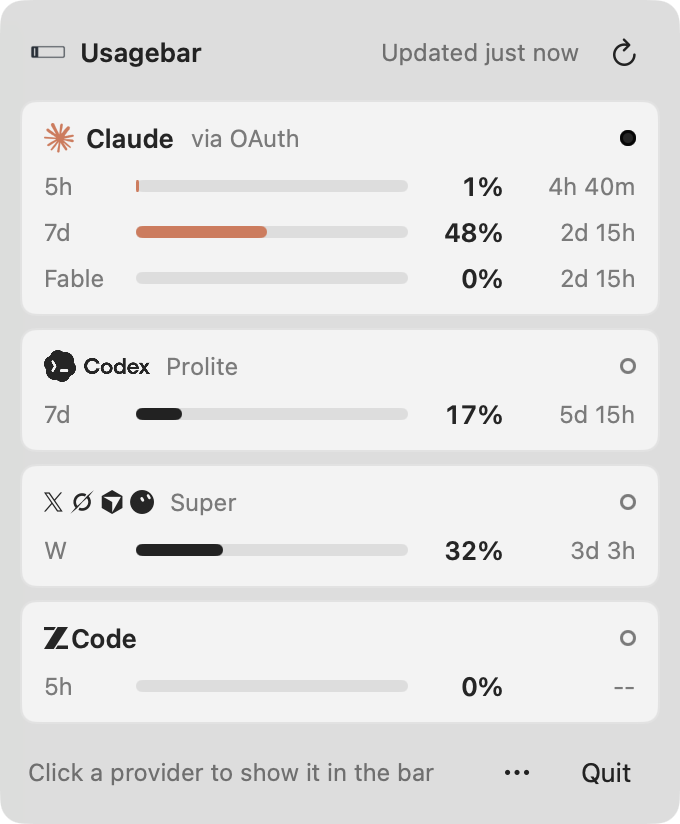
Live preview
The real app interface, not a placeholder mockup.
Quick start
From install to useful in under a minute.
The flow is short because the app is reading what you already have. Install it, open it, and the menu bar becomes the status line for your CLI usage.
01
Install from Homebrew
The fastest path is one command. If you already use Claude Code, Codex, or Cursor, there is nothing else to wire up.
brew install --cask betoxf/tap/usagebar02
Launch it once
Open Usagebar and it immediately checks your local auth stores instead of sending credentials through a hosted service.
open -a Usagebar03
Keep the numbers in sight
Your usage stays in the menu bar. Right-click for a panel with every provider, a meter for each limit, and when it resets.
brew update && brew upgrade --cask usagebarAlt
No Homebrew available
The install script still gives you a clean fallback if you just want the app in Applications and out of the way.
/bin/bash -c "$(curl -fsSL https://raw.githubusercontent.com/betoxf/Usagebar/main/install.sh)"Why it feels better
The utility stays tiny, but the payoff is constant.
Zero-config auth pickup
Usagebar reads the same local CLI-managed auth stores you already use, so setup is usually finished as soon as the app opens.
Private by default
Credentials stay on your Mac. No telemetry, no analytics, and no extra account just to inspect usage.
Every provider you use
Claude Code, Codex, Cursor with Grok Bot, Kimi Code, z.ai, and Grok Build. Show one, rotate them, or let it follow the AI app you are using.
Light enough to disappear
The app sits in the menu bar, refreshes quietly, and avoids becoming another window or dashboard you need to keep open.
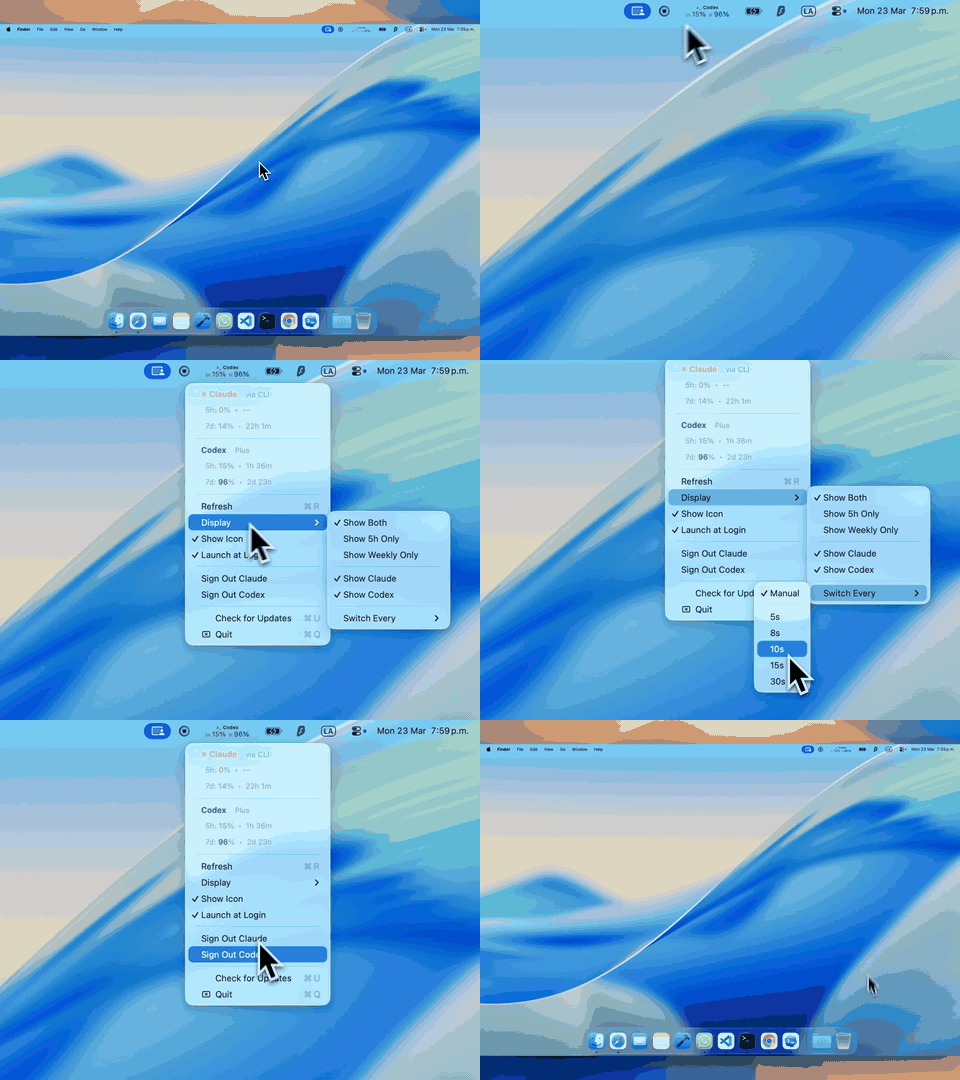
In motion
Usagebar alternating providers inside the menu bar.
Local setup
It works with the auth you already have.
Claude Code
Reads the Keychain item Claude Code-credentials, with ~/.claude/.credentials.json as a fallback. Browser sign-in works when the CLI is not part of your workflow.
Codex
Reads ~/.codex/auth.json after a normal codex login.
Cursor and Grok Bot
Uses the Cursor app's own sign-in. Grok Bot shares the same weekly allowance.
Kimi Code, z.ai, Grok Build
Kimi Code after kimi login, z.ai from a Z_AI_API_KEY or its config file, and Grok Build from ~/.grok/auth.json.
Common commands
Install
brew install --cask betoxf/tap/usagebarLaunch
open -a UsagebarUpdate
brew update && brew upgrade --cask usagebarPrivacy and behavior
All credentials remain local to the Mac.
No telemetry, no analytics, and no hosted sync layer.
Launch at Login, provider toggles, and display controls live under the panel's ⋯ button.
FAQ
Questions people ask before installing.
How do I check my Claude Code usage limit on a Mac?
Install Usagebar and sign in to Claude Code as usual with claude login. The menu bar shows your five-hour window and weekly usage, and the panel adds the Fable limit when your plan has one, with the time until each resets.
Can I see my Codex or ChatGPT rate limits?
Yes. Usagebar reads the Codex CLI sign-in from codex login and shows the Codex primary and weekly windows with their reset times.
Does it work with Cursor and Grok Bot?
Yes. Cursor is picked up from the Cursor app's sign-in. Its weekly allowance is shared with Grok Bot, so Usagebar shows them together.
Which providers does Usagebar support?
Claude Code, Codex, Cursor (with Grok Bot), Kimi Code, z.ai (ZCode), and Grok Build. Each appears as soon as it is signed in on your Mac.
Is Usagebar free? Does it collect my data?
It is free and open source under the MIT license. There is no Usagebar account, no telemetry, and no server in between: usage travels directly between your Mac and each provider.
Is there a Windows or Linux version?
A Windows and Linux version with the same panel in the system tray is in development.
Install Usagebar
If you already use Claude Code, Codex, or Cursor, the menu bar can do the rest.
brew install --cask betoxf/tap/usagebar